
RecoilJS - state based on asynchronous events

In the previous article we got acquainted with the basic API offered by the Recoil library. Today we will move on to a more advanced issue - I will show you how to handle state based on asynchronous events. I will use nothing else but the atoms and selectors described in the previous article.
And today we will build...
a simple interface consisting of a list of users and details of the selected record. The example is not complicated, because the issues I will raise will already be demanding enough. Today we will learn to handle asynchronous events using Recoil in conjunction with React.Suspense. You already know a bit about Recoil if you read the previous article, Suspense is currently a hot topic (at the time of writing, still in the experimental phase) in the React world. Adding to this the fact that Suspense is recommended by the team creating Recoil - this means that we cannot fail to try playing with it.
And here is how our today's creation will look:
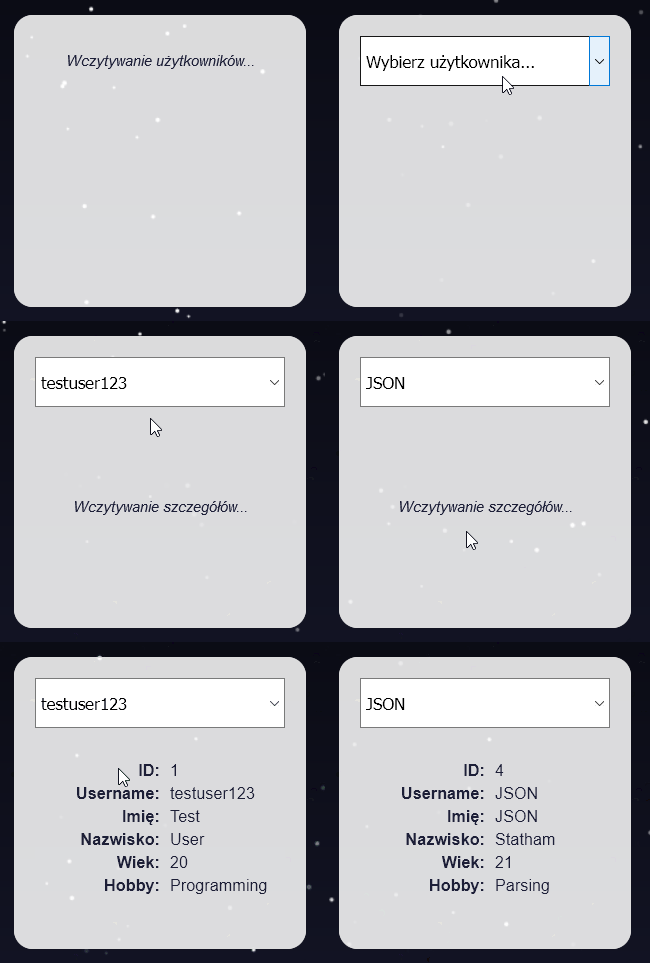
P.S. smart ones probably noticed that in the gif above the repeated query for the same user returns immediately. This is one of the conveniences provided to us by Recoil - caching data coming from read-only sources. In our example we do not handle syncing client state with the server, so our data is just like that. This means that for the second and every subsequent time, instead of performing a query again, the data saved in memory returns.
A bit of theory before practice
To handle asynchronicity we will use selectors already known to you from the previous article. Supplementing the knowledge from the previous article a bit, it is worth saying that functions given to the "get" field of selectors can be asynchronous. This means that we can decorate them with the async keyword and use await inside them (more to read here), or do exactly the same using Promises. It works similarly as in the synchronous example with the counter / calculator. The moment a value is returned, all associated selectors will be updated and views re-rendered. Sounds great, huh?
It is worth saying at least two more words about Suspense. I would prefer not to dwell too long on this subject, so it will be in a nutshell. At this moment it is important that you remember that Suspense is a mechanism allowing to pause rendering of a view dependent on asynchronous data until receiving it. You will find out exactly how it works in a moment.
I will leave more to read about Suspense at the end of the post in the links section.
Simulating asynchronicity
To avoid setting up a backend, we will simulate an asynchronous response coming from the server. How will we do it? We will use a Promise containing setTimeout inside. Specifically speaking - after a specified time has elapsed, calling the callback function given to setTimeout will cause the Promise to fulfill. It will be a scenario similar to classic client-server communication, where sending a query, we wait for a response. The above mechanism will return data defined by us, which we will use in the example.
Implementation below:
//dummy data - list of users and list of full data
const MOCK_USERS = [
 { id: 1, username: "testuser123" },
…
];

const USERS_WITH_DETAILS = [
 {
   id: 1,
   username: "testuser123",
   name: "Test",
   surname: "User",
   age: 20,
   hobby: "Programming",
 },
…
];
// functions returning our prepared data
export const queryUsers = () => {
 return new Promise((resolve) => {
   setTimeout(() => {
     resolve(MOCK_USERS);
   }, 3000);
 });
};

export const queryUserDetails = (id) => {
 return new Promise((resolve) => {
   const user = USERS_WITH_DETAILS.find((user) => user.id === parseInt(id));

   if (!user) resolve(null);

   setTimeout(() => {
     resolve(user);
   }, 3000);
 });
};
Recoil State Definition
We will need three fields stored in the state:
- List of all users, which we will later display in the form of a select field with options. Note that the state is based on the previously defined asynchronous function fetching users.
export const usersListState = selector({
  key: "usersListState",
  get: async () => await queryUsers(),
});
- ID of selected user (necessary to download their full data). Initially it will be empty - note that I defined it as "null" (string), to avoid React errors saying that select / option should not accept null values. It is the only fragment of state changing as a result of operations performed by the user. It is therefore a local application state, which is why it was described using an atom.
export const selectedUserIdState = atom({
  key: "selectedUserIdState",
  default: "null",
});
- Detailed data of the selected user, which we will query at the moment of selecting a user. Note that the function retrieves the ID of the selected user from the atom, and then using it asynchronously downloads the details of the given record.
export const selectedUserDetailsState = selector({
  key: "selectedUserDetailsState",
  get: async ({ get }) => {
    const userId = get(selectedUserIdState);

    return await queryUserDetails(userId);
  },
});
Components using state
We will create three components:
- Selectable user list – Note that the way of using Recoil API inside components (useRecoilValue and useRecoilState) does not differ anything from the example with synchronous Counter and Calculator.
export const UserPicker = () => {
  const userList = useRecoilValue(usersListState);
  const [selectedUserId, setSelectedUserId] = useRecoilState(
    selectedUserIdState
  );

  const onChange = (e) => {
    setSelectedUserId(e.target.value);
  };

  const renderList = () => {
    return userList.map((user) => (
      <Styled.Option value={user.id} key={user.id}>
        {user.username}
      </Styled.Option>
    ));
  };

  return (
    <Styled.Select onChange={onChange} value={selectedUserId}>
      <Styled.Option value={"null"} disabled>
        Choose user...
      </Styled.Option>
      {renderList()}
    </Styled.Select>
  );
};
- Details of selected user
export const UserDetails = () => {
  const userDetails = useRecoilValue(selectedUserDetailsState);

  return userDetails ? (
    <Styled.Form>
      <Styled.Row>
        <Styled.Label>ID: </Styled.Label>
        <Styled.Value>{userDetails.id}</Styled.Value>
      </Styled.Row>
      <Styled.Row>
        <Styled.Label>Username: </Styled.Label>
        <Styled.Value>{userDetails.username}</Styled.Value>
      </Styled.Row>
      <Styled.Row>
        <Styled.Label>Name: </Styled.Label>
        <Styled.Value>{userDetails.name}</Styled.Value>
      </Styled.Row>
      <Styled.Row>
        <Styled.Label>Surname: </Styled.Label>
        <Styled.Value>{userDetails.surname}</Styled.Value>
      </Styled.Row>
      <Styled.Row>
        <Styled.Label>Age: </Styled.Label>
        <Styled.Value>{userDetails.age}</Styled.Value>
      </Styled.Row>
      <Styled.Row>
        <Styled.Label>Hobby: </Styled.Label>
        <Styled.Value>{userDetails.hobby}</Styled.Value>
      </Styled.Row>
    </Styled.Form>
  ) : null;
};
- Container wrapping both above, in which we will use Suspense to show a loading view at the moment when we expect a response.
export const Users = () => {
 return (
   <Styled.Container>
     <React.Suspense
       fallback={<Styled.Loading>Loading users...</Styled.Loading>}
     >
       <UserPicker />
     </React.Suspense>
     <React.Suspense
       fallback={<Styled.Loading>Loading details...</Styled.Loading>}
     >
       <UserDetails />
     </React.Suspense>
   </Styled.Container>
 );
};
And that would be it!
We managed to tame asynchronicity using Recoil. The library also offers synchronization of local state with remote state. Unfortunately on the day of writing this article it constitutes an unstable API. This means nothing else but a high probability that it will change. If only it gains a little stability and I have the opportunity to face it, I will definitely describe to you the result of these struggles in detail ;) For those willing - here you will find a little more information on this subject.
The described example has been attached to the repository from the previous article. Link to the repo can be found here.
More to read about handling asynchronicity in Recoil:
And about Suspense: